
Vibe coding with iPhone using Claude Code and Nozbe MCP
✅Nozbe,⭐️Featured
I’m an iOS Shortcuts fan but recently I feel like Apple is making the shortcut-building experience worse and worse, especially when you’re building long ones. Because of that, last Friday I decided to convert one of my yet unpublished, but highly-useful Shortcuts, called “Keynoter”, to an iOS app. I knew exactly what I wanted so I turned into a director who’s managing Claude AI model Opus 5.5, who’s doing the actual programming. Suffice to say, the experiment was a success and very soon I’ll publish this app for everyone to use, but today I’ll focus on my setup. This is a behind-the-scenes post and here are the details:
- Step 1. Create a repository for a new project
- Step 2. Add a project in Nozbe and local MCP connection
- Step 3. Setting up rules about Nozbe in CLAUDE/Agents.MD
- Step 4. Build the first version of the app and submit it to TestFlight
- Step 5. Set up remote control of Claude
- Bonus Step: Tailscale and Screens!
- That’s it, now I can keep building app by just talking to Claude using my iPhone!
- What surprised me in this process?
- Update: listen to the behind-the-scenes story…
Step 1. Create a repository for a new project
First I go to GitHub and create a new repository for my new project. I give it a name, make it private (for now), tick to create a README file and accept.
Then on my Mac Mini I open the Github app and clone that same repository onto my Mac. Then I open the Claude app (I’m on a Max subscirption) and go to Claude Code and open a new chat from the same directory where my Github repository is. I make sure the model “Opus 5.5” is active. I explain to Claude that I’m building an iOS app as explained in README.
Step 2. Add a project in Nozbe and local MCP connection
I’m a founder of Nozbe - I think in our structure:
projects ➡️ tasks ➡️ comments
…and I like to have my ideas and things structured. I don’t like a continuous chat with AI, I feel more comfortable having its context limited to each particular task (it’s also good for AI productivity, I hear). So even if I’m going to work with AI in a chat interface, I want to be able to give feedback to my AI and have information associated with each task in its comments.
So I set up a new project with the name of this particular app.
We just launched a local MCP connection to Nozbe which means my Claude Code app has a quick and direct access to my desktop Nozbe app for the Mac. It can quickly update tasks and projects without going through the Internet. And when it does, Nozbe syncs all this information through the Internet with all my other Nozbe apps on the iPhone and iPad.
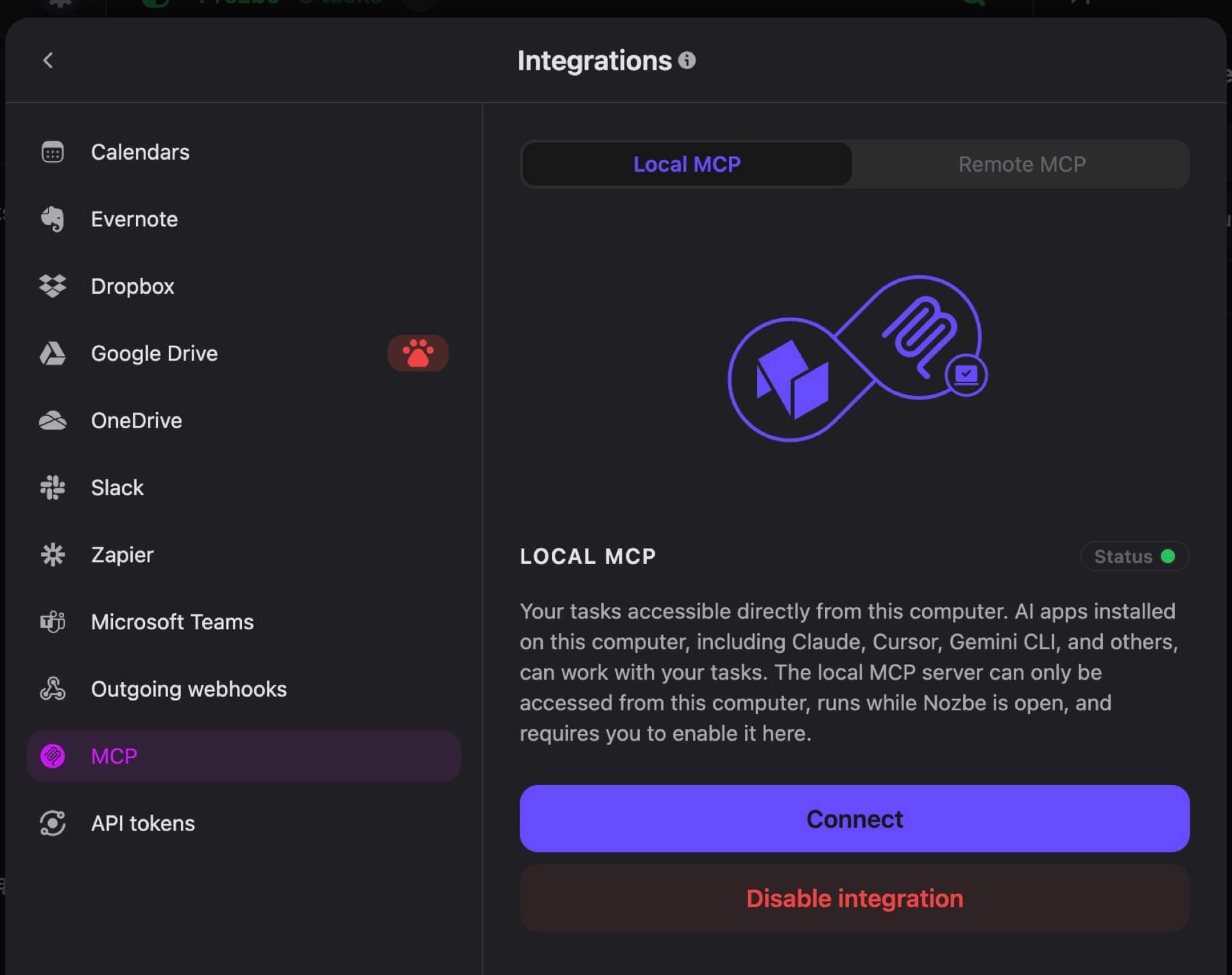
I set up the local MCP connection and ask Claude if it’s connected to Nozbe. When it confirms I add my first task to the project and in the comment I paste the link to my Shortcut.
Step 3. Setting up rules about Nozbe in CLAUDE/Agents.MD
Now it’s the fun part. I tell Claude that it should set up instructions for itself with our common rules of engagement. I don’t want to rely on its own memory but on written rules that it checks before each prompt and updates when necessary.
I ask it to clear its memory and dump it to this file and suggest a structure for it.
It creates this file and I explain to it that whenever we agree on something, the new rule should go there. And I set up some basic rules about working in Nozbe - we work in one project only, we add comments to tasks (before coding and after it’s done) and it never completes tasks but moves them to a different section for me to review. And it keeps checking Nozbe to see if I added new tasks…
Here are direct quotes with the redacted project details from my very own CLAUDE.MD:
- Tasks and projects live in Nozbe. “Tasks” and “projects” mean the NAME project (
ID_PROJECT) in the NAME team (ID_TEAM), via thenozbe-localtools. Scope every call to that project. Don’t read or change other projects or teams unless explicitly asked. New tasks are always assigned to the user (Michael,ID_USER) when they’re created. - Never complete Nozbe tasks yourself. When work on a task is done and committed, move it to the To be reviewed section of the project and ask whether to complete it. Complete a task only when the user explicitly says so; they may have feedback.
- Check Nozbe after every commit. After each commit, fetch the project’s open tasks again directly from Nozbe (don’t rely on earlier lists) and report what’s pending outside “To be reviewed”, including new tasks and new comments.
- Plan goes to the task first. Once we agree on a course of action for a task, add the plan as a comment on that Nozbe task before writing any code.
- Keep this file current. This file holds working agreements, product decisions and technical constraints; how the app behaves goes in the README. Whenever a new agreement, rule or decision comes up, propose adding it here: quote the exact wording, add it once the user agrees, and commit it like any other change. Do the same when an existing rule changes or no longer applies.
Working like this is awesome. As Claude is coding a current feature, I’m testing the app, adding new tasks, adding feedback in Nozbe and making sure I don’t forget about something else down the line.
Again, the local MCP connection works great between the Claude app and the Nozbe Mac app. It’s blazingly fast.
Step 4. Build the first version of the app and submit it to TestFlight
I started off locally working on my Mac so Claude built and installed new versions of the iOS apps on both my iPhone Air and my iPad Pro as they are connected to the same WiFi.
However, if I want to keep working with Claude and keep downloading new builds even if I’m not home, I need to set up TestFlight. Turns out you can do it quickly and set up “internal” testing first to make sure you get the latest builds fast.
I ask Claude to set up TestFlight and it creates a placeholder icon and some other stuff and builds the first build.
Now I have to go to App Store Connect. As I already have a Developer account thanks to Nozbe I just go to Apps and create a new app.
However, before doing that I also have to create an app ID, so I go to Identifiers and create a new one for my app. Later I go to Apps and create a new app and choose this identifier. Once it’s created I click on this new app and go to “TestFlight” section and add a new internal test group and add myself as a “tester” for this app.
Now I ask Claude again and this time it succeeds to create a TestFlight build. After a few minutes I get an email inviting me to TestFlight of this app and I can install it.
Making sure the builds are built…
Apple’s Xcode app is great and all, but it has bugs, too. Turns out that it for no reason can log you out of your developer account. Randomly. It happened to me, and I asked Claude about it and it turns out a better way is to create an API key to be able to send the builds to TestFlight even if the Xcode fails.
I had to log in to App Store Connect and in “Users and Access” and “Integrations” and “App Store Connect API” set up a new one with “Admin Role” as it needs the “iOS Distribution” certificate. The “App Manager” role wasn’t apparently enough.
Claude saved the certificate file (you can only download it once!) outside of the GitHub repo and added information about it along with its authentication key (36 characters with dashes) in the rules file.
Step 5. Set up remote control of Claude
Let’s recap:
- I’ve set up the repository and I can access it remotely through the GitHub web site or app. As fallback I’ve also cloned the repository on my iPad using the excellent Working Copy app.
- I’ve set up a project in Nozbe for my app and I can access it with my Nozbe apps on both the iPhone and the iPad and every task and comment sync almost instantly with my local Nozbe Mac app that’s connected through MCP to the Claude Code.
- I’ve set up TestFlight so when Claude finishes something I will have a downloadable build to be able on both of my devices. Great.
Now all I need to do is to keep talking to Claude even if I’m out of the office - so I’m setting up Remote Control. I put the command: /remote-control and I’m done!
Bonus Step: Tailscale and Screens!
After I’ve written this post and I went away for my Nozbe reunion trip at some point my remote control session with the Claude on the Mac got turned off. I had to be able to turn it back on when I was away. I needed remote control to my Mac:
- On the Mac I turned on “Screen Sharing” in “General / Sharing”.
- I also installed Tailscale - free account is enough to be able to see my Mac as a “local” machine even when I’m away. After setting it up I turned it on right away.
- On my iPhone I downloaded Tailscale as well and logged in and made sure both of my machines “saw” each other within one network. Even when I switched the iPhone to cellular only.
- On the iPhone I downloaded Screens 5 app which lets me easily set up remote control from the iPhone. In Screens I also set up Tailscale connection and I could log in to my Mac and see its screen when necessary.
- Screens is a paid app - I got a free trial which was enough to be able to log in and change some settings.
What’s strange for me is that Apple doesn’t offer any first-party “Screen Viewer” app for iOS that would connect to the Mac. Maybe I should vibe-code one?
That’s it, now I can keep building app by just talking to Claude using my iPhone!
It works amazingly. I have Claude app open and chat with it over there. When it’s busy working, I’m adding or updating tasks in Nozbe to make sure I don’t forget anything and have a plan for future features.
Each time Claude finishes something, it moves the task “to be reviewed” and builds a TestFlight build and checks what’s next to do in Nozbe. Very often Claude suggests what to tackle next. I confirm and it keeps going. Meanwhile I’m testing the app and if it’s not up to snuff or I have some improvement ideas, I add them as a comment to the task.
What surprised me in this process?
First off, I can’t believe how good of a coder Claude Opus 5.5 with Medium effort is. It’s building features fast, creating tests (!) for each new thing and reports back with suggestions or improvement ideas.
Second thing - the MCP connection with Nozbe is invaluable. To a person like me who has their tasks in Nozbe anyway, working with it in tasks and comments feels just natural and gives me a sense of control to make sure Claude doesn’t just go off the rails.
Third. Let’s leave all the “programmers are irrelevant” or “Nozbe is not needed” discussions for later. I’ve just had one of most productive weeks of my life and I built my first iOS app which I always wanted and I can’t wait to share it with you.
I’m not releasing it yet as I’m heading to meet my team at our annual Nozbe reunion and won’t have the time to launch it properly. Stay tuned.
Update: listen to the behind-the-scenes story…
We just published NoOffice podcast 97 where I’m sharing the app’s name, its purpose and also the entire story behind the app and how fast I managed to build it. Subscribe to the NoOffice podcast to listen!