
A hack to create FUNCTIONS in Shortcuts
🔗Shortcuts
I love Apple Shortcuts and I use them a lot on my iPad, iPhone and the Mac. Some of my Shortcuts are very complex and have hundreds of actions, especially my Journaling Shortcut. In the past I’d use one main Shortcut and if I needed additional options or functionality, I’d build additional “helper” Shortcuts to support it, because the Shortcuts don’t offer any kind of Functions. This means you cannot ask one Shortcut to run only a smaller set of actions several times… or can you?
Function = “Run Shortcut” Action with parameters
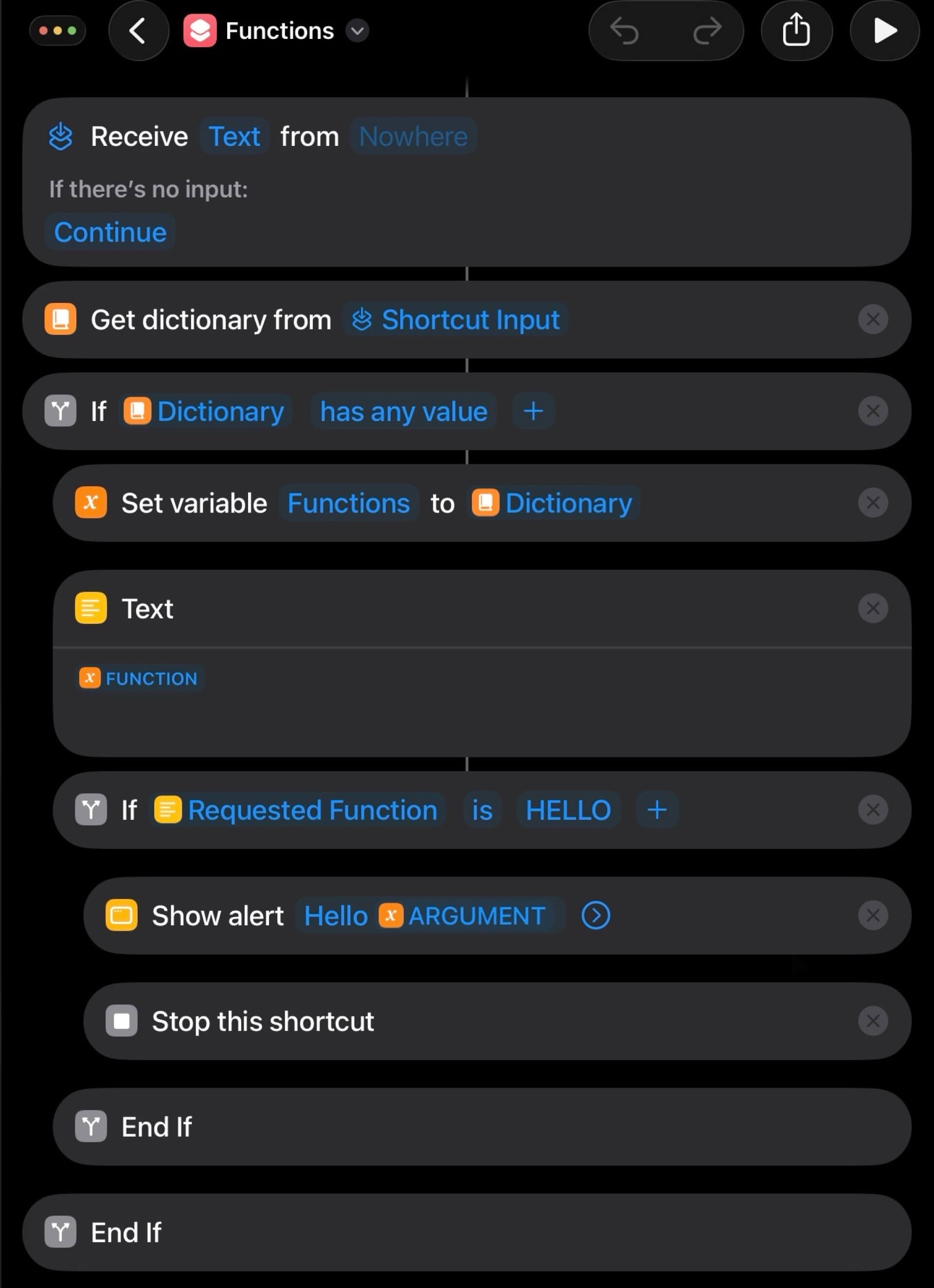
The hack to create functions in Shortcuts is to create a set of parameters and later use the action “Run Shortcut” and be able to recognize that this time you don’t want the entire Shortcut to run, but only a part of it. Here’s my example basic Shortcut that supports functions:
Functions - example Shortcut
When you add this Shortcut and open it, you’ll see that it checks if in “Shortcut input” there’s a “Dictionary” passed to it. If it is, it checks if these parameters have a name of a “function” and if they do, it runs the set of actions associated with this “function” and even uses additional “arguments” being passed to it.
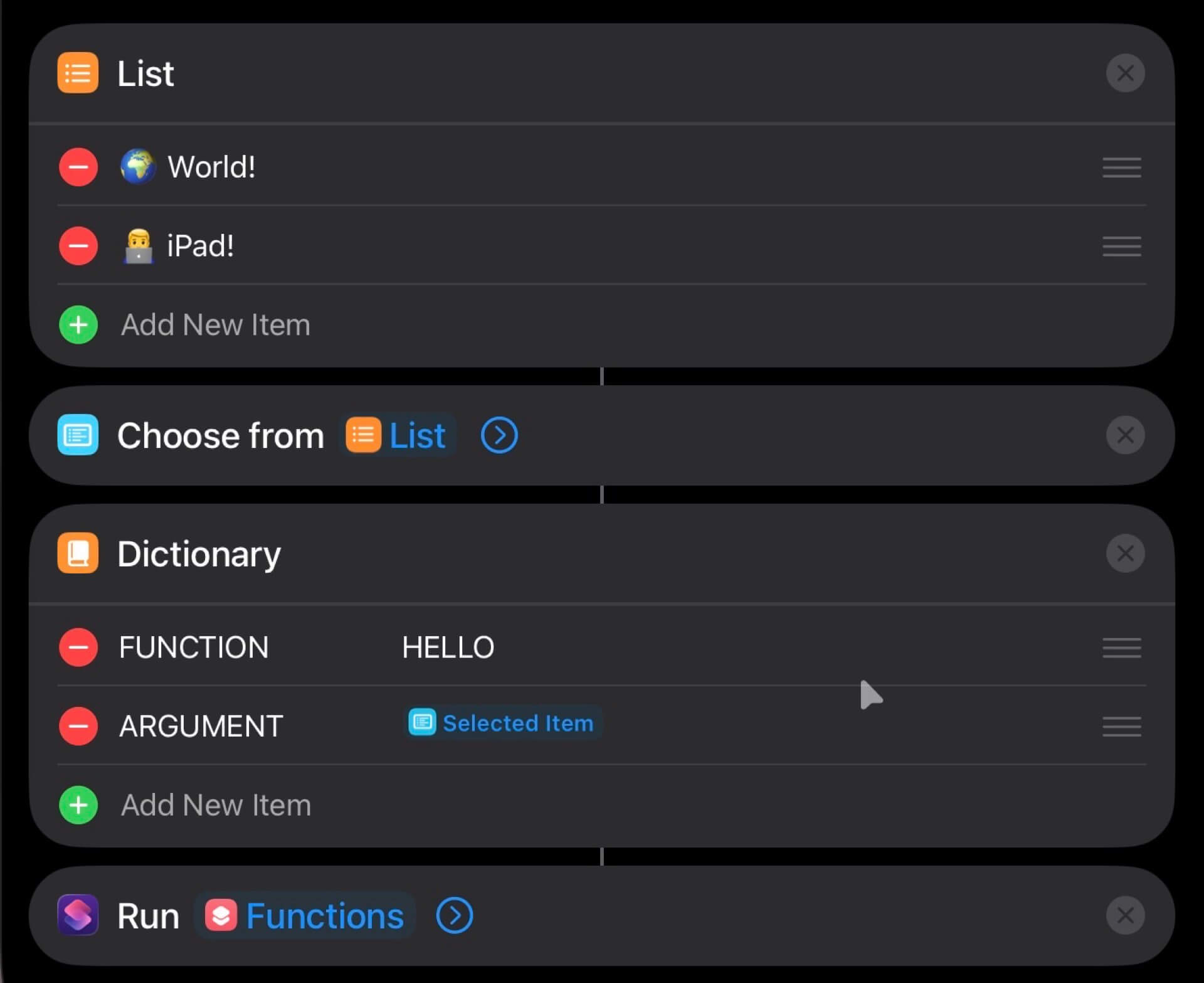
When there are no arguments the Shortcut just ignores this part and runs. In my example you can choose one of two different arguments and later you see how it creates the Dictionary with a parameter for function name and a parameter for an argument and passes it back to the same Shortcut.
Shortcuts with functions can grow very fast!
As you can see in my Journaling Shortcut, a Shortcut with many “functions” can grow to a substantial size of many actions. Hundreds of them.
I’ve grown to like writing Shortcuts this way, because I’d rather send people one big Shortcut than a smaller one with lots of small “helper” Shortcuts as functions.
The problem with iOS27 beta…
In two weeks iOS27 launches and I tested my bigger Shortcuts on a test iPhone with iOS27 installed and there is a huge regression of how iOS27 treats the “Run Shortcut” action compared to iOS26.
In iOS26 when you choose a huge Shortcut to run using “Run Shortcut” action, it runs immediately, while in iOS27 beta 8 (just checked!) it thinks for a few seconds (5-10 seconds!) before it runs this huge Shortcut. I hope this behavior doesn’t stay this way because it effectively kills this “functions hack” for Shortcuts and makes my huge Shortcuts unusable. I filed a feedback to Apple about it.
At the time of this writing I’m not upgrading my main iPhone Air or iPad Pro to iOS27… and I’ll update this post when this changes.
Do you like the way I create “functions” in Shortcuts?
If you’ve been wondering how to create “functions” in Shortcuts, here’s how I do it. Hope it helps and if you’ve got any other suggestions how I should approach functions in Shortcuts, do let me know!